

- Messages
- 311
- Reaction score
- 0
- Points
- 18
Reputation:
 Seal Character System
To seal or unseal your character into a Ring, please follow the steps below:
1) Purchasing the Required Item
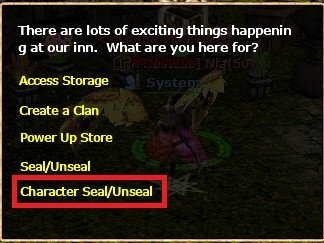
Go to the INN HOSTESS NPC with a Seal Scroll, then click the related option.
2) Seal / Unseal Options
You will see two options.
- Select Seal to create a Seal Ring.
- Select Unseal to open the ring again.
3) Sealing the Character
After selecting Seal, insert the Seal Scroll and click Confirm.
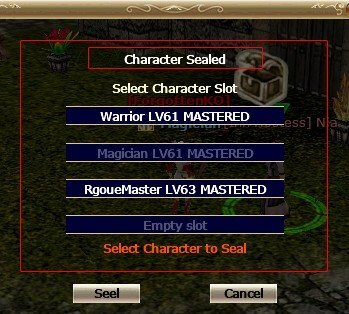
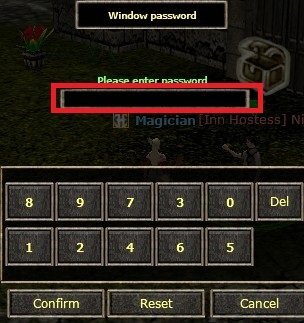
A new screen will appear—choose the character you want to seal, click Seal, and enter your Item Lock password when prompted.
Once completed, the character will be placed in your inventory in Ring form.
You can follow the same steps above to unseal the ring.
Important Notes:
• The sealing process must be done using a side character, not the character being sealed.
• When unsealing a ring, you must have at least one empty slot available on account .
• The character opening the ring and the ring itself must belong to the same Nation.

After selecting Seal, insert the Seal Scroll and click Confirm.
A new screen will appear—choose the character you want to seal, click Seal, and enter your Item Lock password when prompted.
Once completed, the character will be placed in your inventory in Ring form.
You can follow the same steps above to unseal the ring.
Important Notes:
• The sealing process must be done using a side character, not the character being sealed.
• When unsealing a ring, you must have at least one empty slot available on account .
• The character opening the ring and the ring itself must belong to the same Nation.